
Architecture
Estudar is a build-free PWA served by a Cloudflare Worker, with Supabase for accounts and data and an AI provider of your choice. Everything runs on the free tiers.
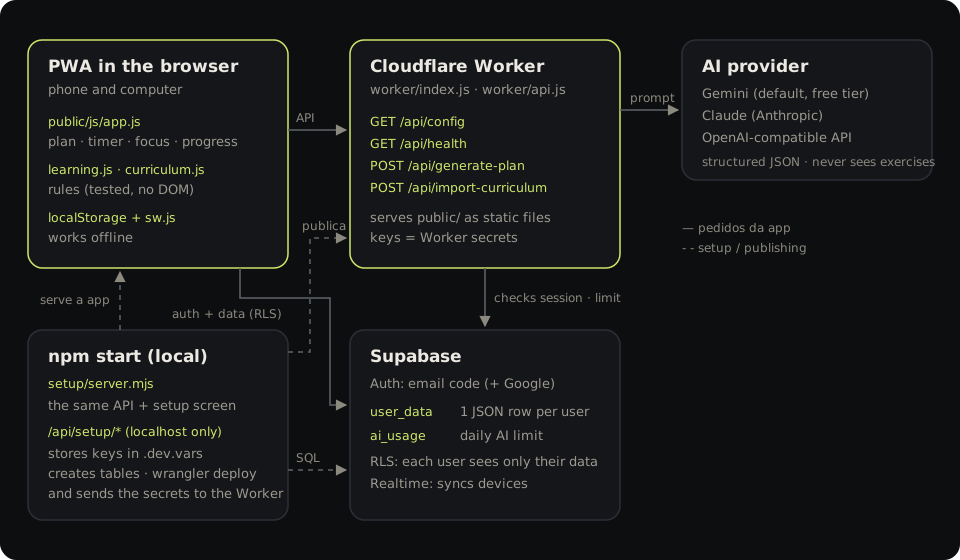
Components
| Component | Where | Responsibility |
|---|---|---|
| PWA | public/ | Interface, learning rules, local copy of the data, offline |
| Worker | worker/index.js | Serves public/ as static files and routes /api/* |
| Shared API | worker/api.js | /api/config, /api/health, /api/generate-plan, /api/import-curriculum |
| Local server | setup/server.mjs | npm start: the same API + /api/setup/* to configure and publish |
| Supabase | supabase/migrations/ | Auth (email code, optional Google), user_data, ai_usage, Realtime |
| AI | configurable | Generate the plan; read the curriculum from a photo |
Decisions
No build. HTML, CSS and ES modules served as they are. Fewer moving parts for anyone who forks, and any static host can serve public/.
One API, two runtimes. worker/api.js uses only web APIs (fetch, Request, Response), so it runs unchanged on the Worker and on the Node process behind npm start. What works locally works when published.
Configuration from the server, not the code. The app requests /api/config on start-up; nobody edits files to connect their Supabase. Without an API (static hosting), the app switches to local mode.
Keys only on the server. The AI key and the Supabase secret key live as Worker secrets. The browser only receives the Supabase public key, protected by RLS.
One document per user. Each person's data is one JSON document in one Postgres row. Simple to sync, to export and to reason about; the merge rules are in Data model.
Pure, tested rules. The logic that decides what counts as learning (learning.js) and the academic rules (curriculum.js) never touch the DOM or storage, so they have unit tests — see Tests.
The AI is untrusted. Every AI response is cleaned and validated on the server and in the client, and reviewed by the user before it is saved. A generated plan always goes through the science check.
Languages
The app is in Portuguese and English. The language is detected from the browser and can be changed in Account → Language.
public/js/i18n.jsexportst(). The Portuguese source strings are the keys (gettext style):t('Hoje')returnsTodayin English. Code stays readable, and a missing translation falls back to Portuguese rather than showing a raw key. Placeholders work the same in both languages:t('Acertaste {c} de {d}', { c: 3, d: 5 }). Static HTML is translated in place bytranslateDOM().public/js/i18n-en.jsis the English dictionary: an object mapping each Portuguese string to its English text.- Server messages follow the same scheme. The app sends an
X-Estudar-Langheader;worker/i18n.jsreads it and translates the Worker API andnpm startmessages. The AI-generated plan is written in the same language. tests/i18n.test.mjsfails if any string used in the interface or by the server lacks an English translation, or if a translation drops a{placeholder}or an HTML tag.
Adding a new language is mostly one more dictionary file like i18n-en.js; i18n.js then needs a few lines to register it (LANGS, the lookup in t(), and day and month names).
Repository structure
public/                  the app — the only folder published as static files
  index.html  css/  icons/  manifest.json  sw.js
  js/app.js              interface controller
  js/learning.js         learning rules (mastery, calibration, allocation, dates)
  js/curriculum.js       degree record rules (averages, assessments, exam periods, prerequisites)
  js/planner.js          plan editor + science check
  js/logsheet.js         block log, closed-book tests, exam grade
  js/percurso.js         degree record: photo import, module editor, report
  js/setup.js            Server & keys screen + status panel
  js/backup.js           backup format (export / validate)
  js/storage.js          local data + Supabase (auth, sync, realtime)
  js/data.js             sample plan, normalisation, dates
  js/timer.js            clock-based timer (survives the background and closing the app)
  js/focus.js            full screen, wake lock, sounds
  js/i18n.js             t(), language detection and switching
  js/i18n-en.js          English dictionary
worker/
  index.js               Worker entry point
  api.js                 shared API
  i18n.js                server messages in English (X-Estudar-Lang)
setup/server.mjs         npm start
supabase/migrations/     SQL for the tables and access rules
tests/                   rule tests (npm test)
docs/                    this site (VitePress) and the screenshot generator
wrangler.jsonc           Worker configuration
Main flows
Start-up
- The PWA loads from
public/(or from the cache, offline). - It requests
/api/config. If Supabase is configured, it loads the SDK and restores the local session; otherwise, local mode. - With a session: it merges the local copy with the
user_datarow and subscribes to real-time changes.
Generating a plan
- The editor calculates the suggested allocation and the weak foundations.
POST /api/generate-planwith the session token.- The Worker confirms the session with Supabase, checks the daily limit and calls the AI with the science-based prompt and a JSON schema.
- The response is validated, normalised and goes through the science check in the editor. The user saves it.
Publishing
npm start→ Publish:wrangler deployuploads the Worker andpublic/.wrangler secret bulkuploads the keys (from a temporary file deleted straight afterwards).- The published URL is stored in
.deploy.json; the Cloudflare status item then checks<url>/api/health.